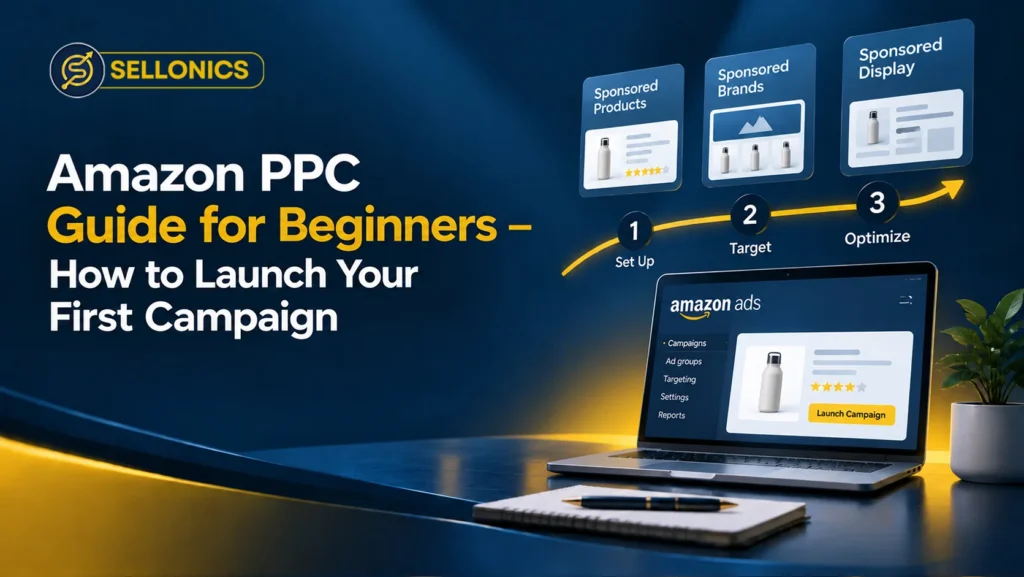

If you have just listed a product on Amazon, you have probably heard that ads are the fastest way to get seen. This Amazon PPC guide for beginners explains what Amazon PPC is, why it matters, and how to set up your first campaign without wasting your budget.
You do not need to be a marketing expert to get started. Once you understand a few core ideas, the process is much simpler than it looks inside Seller Central.
What Is Amazon PPC and Why It Matters
Amazon PPC stands for pay-per-click advertising. It is Amazon’s system for showing your product to shoppers who are already searching for something similar.
You only pay when someone clicks your ad. If nobody clicks, you pay nothing, even if thousands of people see it.
For new sellers, this matters because Amazon is crowded. Organic ranking takes time to build, and a brand new listing with no reviews rarely gets found on its own. PPC gives you a way to appear on the first page while your listing builds sales history and reviews.
The Main Types of Amazon PPC Ads
Amazon offers three ad types you will meet as a beginner. Each one works differently and serves a different purpose.
Sponsored Products
Sponsored Products ads promote a single listing. They appear in search results and on competitor product pages. This is the ad type most beginners should start with, since it is simple to set up and directly tied to sales.
Sponsored Brands
Sponsored Brands ads show your logo, a custom headline, and several products together. They appear near the top of search results and work best once you have a registered brand and more than one product to feature.
Sponsored Display
Sponsored Display ads retarget shoppers who viewed your listing but did not buy. They also appear on other websites, not just Amazon. Most beginners can leave this ad type until they have some sales data to work from.
Auto vs Manual Campaigns
When you create a Sponsored Products campaign, Amazon asks you to choose between automatic and manual targeting.
- Amazon picks the keywords for you based on your listing content. This works well for your first two to three weeks, since it shows you which real search terms actually lead to sales.
- You choose the exact keywords and set your own bids. This gives you more control, but it works best once you already have some data to guide your choices.
A common approach is to run an automatic campaign first, then move the keywords that convert well into a manual campaign. This way, your early spend teaches you something instead of just using up budget.
What are Keyword Match Types
Once you move to manual campaigns, you will choose a match type for each keyword. This controls how closely a shopper’s search has to match your keyword before your ad is shown.
Broad Match
Broad match shows your ad for searches related to your keyword, even with extra words or a different word order. It reaches the most people, but it can also bring in less relevant clicks.
Phrase Match
Phrase match shows your ad when the search includes your exact keyword phrase, with extra words allowed before or after it. It sits in the middle between reach and precision.
Exact Match
Exact match shows your ad only when the search closely matches your keyword, with no extra words in between. It brings fewer clicks, but they tend to convert better.
How Much Does Amazon PPC Cost for Beginners
Costs vary by category, but most UK beginners pay somewhere between £0.30 and £1 per click. A realistic starting daily budget is around £10 to £20 per campaign.
Two numbers matter more than your daily budget:
- ACOS (Advertising Cost of Sales): the percentage of sales revenue spent on ads. A lower ACOS usually means more profitable advertising.
- TACOS (Total Advertising Cost of Sales): ad spend measured against your total sales, including organic sales. This shows how much your ads are supporting the whole business, not just paid sales.
A sensible ACOS target depends on your profit margin. If you do not already know your margin, work that out first. It decides what you can actually afford to pay per click.
Before you increase ad spend, it is worth checking that your listing itself is ready to convert. Our Amazon SEO optimisation services review your titles, images, and backend keywords, so paid traffic has a better chance of turning into a sale.
If you want a second opinion before you launch anything, you can get a free listing audit from our team. It takes a few minutes and shows you where ad budget might be going to waste before you spend a penny.
How to Set Up Your First Amazon PPC Campaign
Setting up your first campaign is the practical half of any Amazon PPC guide for beginners. Here is the basic process inside Seller Central.
- Log in to Seller Central, open the Advertising tab, and select Campaign Manager.
- Click Create Campaign and choose Sponsored Products.
- Name your campaign clearly, for example by product and date, so you can find it later.
- Set a daily budget you are comfortable testing, usually £10 to £20 to start.
- Choose automatic targeting for your first campaign.
- Select the product you want to advertise and confirm it is in stock.
- Launch the campaign and leave it running for at least two weeks before making changes.
Not every account can advertise straight away. Check Amazon’s own Sponsored Products eligibility requirements first, since a Professional Selling Plan and an active listing are usually required. Amazon’s Amazon Ads getting started guide also walks through registration and campaign creation in more detail if you want the official version.
Common Amazon PPC Mistakes Beginners Make
Most wasted ad spend comes from a handful of avoidable mistakes.
- Changing bids and budgets every day instead of waiting for enough data to build up
- Skipping negative keywords, so ads keep showing for searches that were never relevant
- Running ads on a listing with weak images or an unclear title
- Advertising every product at once instead of starting with your best seller
- Ignoring the search term report, which shows exactly what shoppers typed before they clicked
How to Read and Optimize Your Results
Once your first campaign has run for two to three weeks, check these reports:
- Search term report: shows which real searches led to clicks and sales
- Targeting report: shows how each keyword or product target is performing
- Campaign performance: shows spend, clicks, and ACOS at a glance
Move strong-performing search terms into a manual campaign. Add poor-performing ones as negative keywords so your budget stops going to them.
Many sellers now rely on automation and reporting tools instead of checking every report by hand. We covered the growing role of automation in PPC advertising management in more detail, including what still needs a human eye.
Can I Manage Amazon PPC
Running your own campaigns is a good way to learn how Amazon PPC actually works. Many sellers manage their first few campaigns alone and only bring in help once they are spending a larger budget or handling several products at once.
If your account has grown past what you can review each week, or your ACOS keeps climbing without a clear reason, that is usually the point to get another set of eyes on it. There is no fixed rule here. It comes down to how much time you have and how much is riding on the result.
Key Takeaway
Amazon PPC is simple at its core: pick a strong product, start with an automatic campaign, and let the data guide your next move. Patience matters more than any single bid change, since two to three weeks of real data will teach you more than daily tweaking ever will. Once you understand your own numbers, scaling up becomes a much smaller decision.es a much smaller decision.
Book A Call


We manage Amazon complexity, so you can focus on scaling
Built for brands that want predictable Amazon performance without micromanaging every detail.
Real growth. Backed by real numbers.